My cousin’s wedding was three weeks out. Suit ready, shoes polished, everything sorted — except my hair. Same boring cut I’d had for two years. I watched YouTube tutorials at midnight, saved a Pinterest board I never opened again. Still confused.
Then a friend said something that actually helped: “Just try Gemini AI hairstyle. Upload a photo, type a prompt, see how it looks.” I was skeptical — free tools usually mean watered-down results. Ten minutes later I had 15 different hairstyles sitting on my phone, all on my own face. I picked one, got it done two days before the wedding, and at the reception more than one relative asked, “Bro, where did you get this done?”
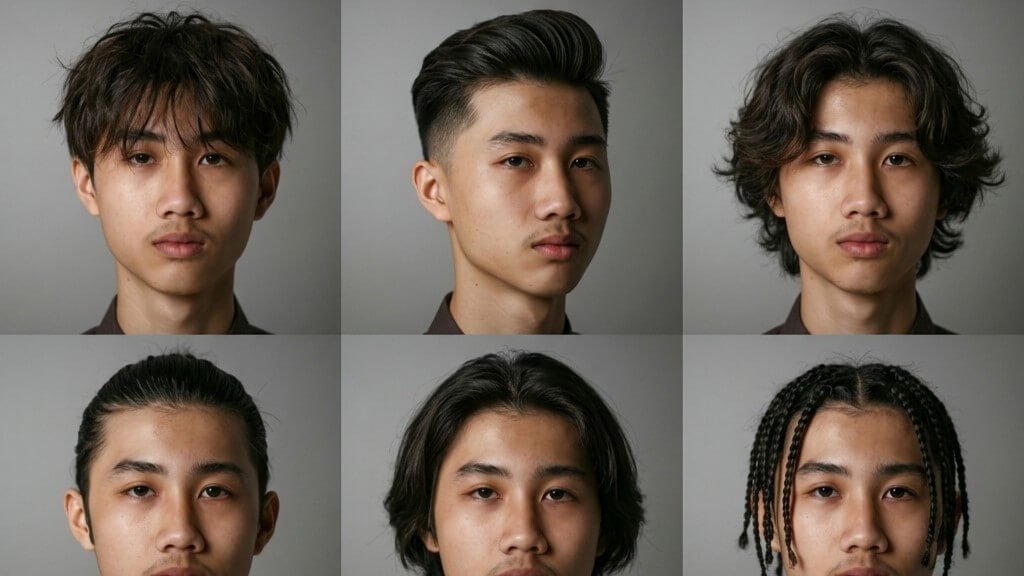
Here’s the exact gemini ai hairstyle method I used, prompts included, so you can try it before your next haircut, wedding, or just because you’re bored of your own face in the mirror.
What Is Gemini AI Hairstyle?
Gemini AI hairstyle isn’t a separate app — it’s a way of using Google’s Gemini, specifically its image model nicknamed “Nano Banana,” to edit a photo of your own hair with plain-English instructions instead of sliders and presets. Some people search for it as gemini hairstyle ai instead — same thing, different word order.
Nano Banana is the codename for Gemini 2.5 Flash Image, which Google released on August 26, 2025. Google’s VP of Gemini shared that over 200 million images had already been edited in the model’s first days — and that stat is exactly why so many “how to use gemini ai hairstyles” articles feel out of date. By Google I/O 2026, Google was reporting more than 50 billion images generated across the whole Nano Banana family. Massive difference.
There’s also a stronger version now. Nano Banana Pro runs on Gemini 3 Pro Image, launched November 20, 2025, and added 4K output, better in-image text rendering, and noticeably stronger consistency across edits — meaning your face actually looks like your face afterward, not a slightly-off AI version of it.
The best part for anyone trying gemini ai hairstyles on a budget: it’s free. Free Gemini app users get a small daily allowance on the Pro model and unlimited use of the standard one. No credit card, no “buy 10 more tokens” popup. It works in both the Gemini app and on the web — though worth flagging honestly: image generation in Gemini Apps currently isn’t available in the EEA, Switzerland, or the UK, is English-only, and isn’t available to users under 18.
How to Use Gemini AI Hairstyle – Step-by-Step
Here’s exactly how I did it, start to finish, in under 10 minutes.
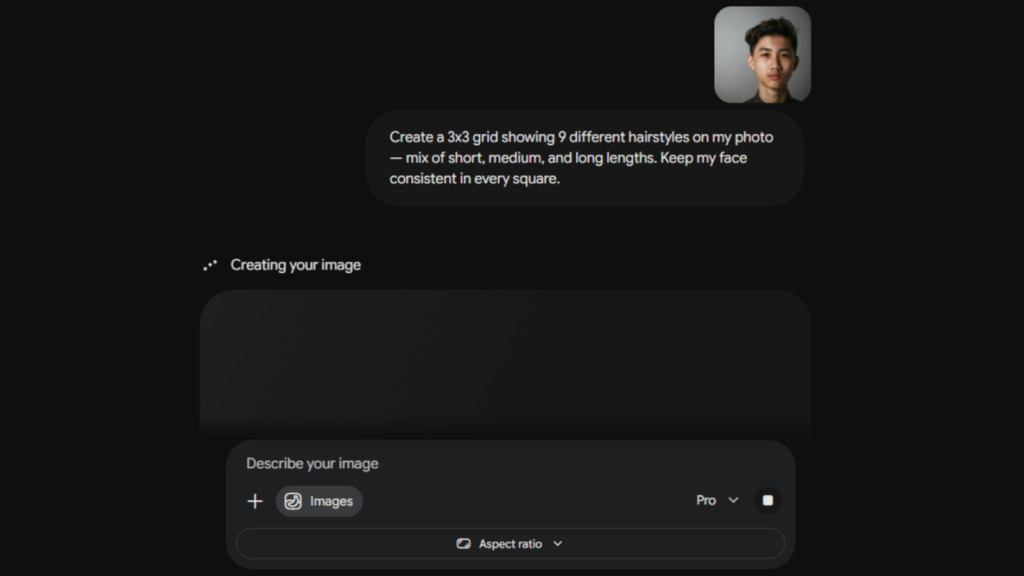
Step 1: Open Gemini. Download the app (Android/iOS) or go to gemini.google.com on your laptop. No paid plan needed.
Step 2: Upload a clear, front-facing photo. Good lighting, no sunglasses, no cap. Face the camera dead-on — this one step decides most of how “real” your gemini ai hairstyle result looks.
Step 3: Type your hairstyle prompt. Be specific about what should change AND what should stay the same — face, lighting, background, clothes.
Step 4: Wait for it to generate. Usually seconds. If it comes back weird — melted hairline, wrong face — just re-run it. It’s not perfect every time.
Step 5: Download or screenshot your favorites. I ended up with 15 saved variations before I found “the one.”
Pro tip: In the model picker, choose Nano Banana Pro (sometimes shown as the “Thinking” model). It reasons through the prompt more carefully before generating, so hairline placement and proportions come out more accurate.
Best Gemini AI Hairstyle Prompts (Copy & Paste)
These are the actual gemini ai hairstyle prompts that worked for me:
For men
- “Change my hairstyle to a clean, short fade with sharp sides. Keep my face, skin tone, expression, and background exactly the same.”
- “Give me a textured crop with a slight quiff. Preserve my facial features and the lighting in the original photo.”
- “Style my hair into a classic side part with a slick finish, wedding-ready. Don’t change my face.”
- “Turn my hair into a low taper with natural curls on top. Keep everything else identical.”
- “Add a light beard to match a buzzcut. Preserve my face shape and camera angle.”
For women
- “Convert my hair into voluminous layers with soft face-framing bangs. Keep my face and outfit unchanged.”
- “Give me a sleek long bob with a center part. Preserve my skin tone and the background.”
- “Style my hair into loose beach waves with a subtle caramel balayage. Don’t alter my facial features.”
- “Create a high, sleek ponytail with baby hairs framing my face. Keep the rest of the photo the same.”
- “Give me soft curtain bangs with shoulder-length layers. Preserve my expression and lighting.”
The one I use most
- “Create a 3×3 grid showing 9 different hairstyles on my photo — mix of short, medium, and long lengths. Keep my face consistent in every square.”
That last one is genuinely the most useful gemini ai hairstyle prompt on this list if you don’t know what you want yet — one prompt, nine options, zero decision fatigue.
Gemini AI Hairstyle vs Other AI Hairstyle Apps
I didn’t stop at Gemini — tried a few alternatives too.
YouCam Makeup’s AI hairstyle tool skips prompts entirely, letting you swipe through dozens of ready-made styles instead, and its premium tier runs roughly $6 to $10 a month depending on the plan. FaceApp, meanwhile, has passed 500 million downloads and bundles hairstyle and hair color changes into a wider set of over 60 filters. HairWow leans into more than 100 try-on styles plus hair and scalp diagnostics, and Style My Hair by L’Oréal Professionnel is built around testing real professional color shades rather than haircuts themselves.
Bottom line: if you already have a cut in mind and don’t mind typing a sentence, gemini ai hairstyle wins on price and realism. If you’d rather swipe with zero typing, YouCam Makeup is easier for pure browsing.
Mistakes I Made When Using Gemini AI Hairstyle
Mistake 1: Blurry, low-light selfie. The AI mirrored the blur into the “new” hairstyle. Bad photo in, bad photo out — no exception.
Mistake 2: Vague prompts. “Give me a nice hairstyle” got me nothing usable. Naming the exact length, texture, and what to preserve fixed it instantly.
Mistake 3: Only one angle. A front-facing shot doesn’t tell you how a fade looks from the side. Uploading a 3/4 angle too was worth the extra two minutes.
Mistake 4: Expecting salon-perfect precision. Gemini ai hairstyle previews are a strong visual guide, not a guarantee — my barber still adjusted the fade slightly for my actual head shape. Treat it as a starting point for the conversation with your stylist, not gospel.
Frequently Asked Questions
How do I use Gemini AI hairstyle?Open Gemini (app or web), upload a clear front-facing photo, and type a prompt describing the hairstyle you want while asking it to preserve your face and background.
Is Gemini AI hairstyle free?Yes — the standard model is free with generous daily use, and even Nano Banana Pro gives free users a daily allowance.
What is the best prompt for Gemini hairstyle?Name the exact cut, length, and texture, then explicitly tell it what to keep unchanged. Vague prompts give vague results.
Can Gemini AI change hair color?Yes — just include the color in your prompt alongside the style, e.g. “change my hair to a warm chestnut brown.”
Is Gemini better than other AI hairstyle apps?Depends what you want. For free, prompt-based, photorealistic edits, gemini ai hairstyle is hard to beat. For a no-typing swipe-through experience, a dedicated app like YouCam Makeup edges it out.
Does Gemini AI hairstyle work on Android and iPhone?Yes — native apps for both, plus the web version on any browser.
Does it work everywhere in the world?Mostly, but not fully — it’s currently unavailable in the EEA, Switzerland, and the UK, and English-only for now.
Final Thoughts
Gemini ai hairstyle changed how I decide on haircuts. No more guessing in the salon chair, no more “just do something, not boring” and hoping for the best. I see it on my actual face first, then commit.
What hairstyle are you going to try with Gemini AI? Drop a comment below — I read every one.
Further reading: Generate images with Gemini Apps – Google Support · Gemini AI hairstyle prompts – Media.io ·