
I used to send out a PDF resume like everyone else — Calibri font, one page, crammed into a template I’d downloaded from some “free resume templates” site years ago. It got skimmed for maybe six seconds inside an applicant tracking system, then sat in a folder nobody reopens.
At some point I got tired of that and started looking into how to build a resume website instead of another PDF — something that actually shows what I can do instead of just listing it in bullet points. My first stop was Wix. Then Squarespace. Then Canva’s site builder. All three were fine, and all three wanted $16 to $25 a month just to keep one page live, on top of an evening spent dragging blocks around a template that a few hundred other job seekers were also using.
That’s around when I moved the whole project into Replit and let its AI Agent do the heavy lifting instead. No subscription, no drag-and-drop grid — just a prompt and a live preview updating next to the code. This guide walks through exactly how to build a resume website this way, start to finish: the real prompts I type, the sections I always include, and the mistakes that cost me an evening so you don’t repeat them.
Traditional Website Builders vs. Free AI Builders: The Quick Comparison
Before I get into how to build a resume website step by step, here’s the comparison that actually changed my mind. And if you searched how to build a website resume instead of the other way around, you’re in the right place — same process either way.
| Factor | Wix / WordPress / Squarespace | Replit / Bolt / Lovable (AI Builders) |
|---|---|---|
| Monthly cost to stay live | Roughly $16–$29/month | Free to build; hosting is often free or a couple dollars |
| Time to a first draft | An evening picking templates and dragging blocks | Minutes — describe it, the AI generates the layout |
| Who owns the code | Locked to their platform, hard to export cleanly | You get real HTML/CSS/JS you can move anywhere |
| Customization ceiling | Limited to the template’s building blocks | Whatever you can describe, or edit by hand |
| Best suited for | Multi-page business sites, blogs, online stores | One-page portfolios, resumes, quick MVPs |
Wix and WordPress make sense for a ten-page business site with a blog and a store attached. For a single-page resume, they’re overkill — you end up paying a business-website price for what should be one clean HTML file. This is exactly where resume builder AI tools like Replit’s Agent, Bolt.new, and Lovable earn their keep: no template marketplace, no monthly toll, just a prompt that builds the thing.
How to Build a Resume Website Step-by-Step in Replit
Here’s the process I actually use, broken into five steps.
Step 1: Set Up a Free Replit Workspace and Launch the Agent
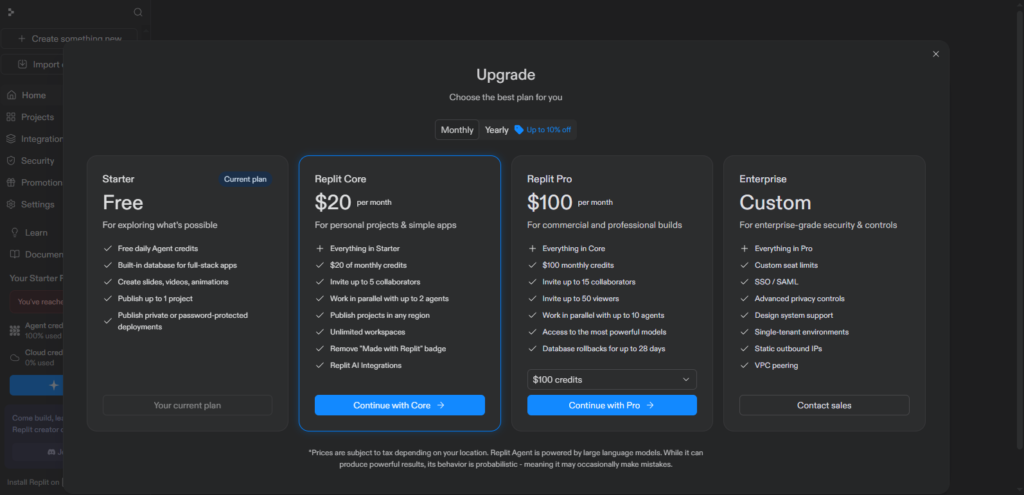
Head to replit.com and create a free account — no credit card required. Click Create App, and instead of picking a template, describe what you want directly in the prompt box. That drops you straight into Agent mode, which is the part that matters here.
Replit’s free Starter plan includes daily AI Agent credits that refresh each day, plus a live workspace and preview pane sitting side by side. That’s genuinely enough to build and iterate on something as focused as a one-page resume site — especially if you spread heavier editing sessions across a day or two rather than trying to do everything in one sitting, since credits can run out faster than you’d expect during a long back-and-forth. If you’ve never touched Replit before, this is the exact setup I point people to anytime they ask me how to build a resume website with zero budget.
One tip: skip the suggested app templates for this project. Start from a blank prompt so the Agent isn’t working around a pre-picked stack you don’t actually need.
Step 2: The Exact AI Prompt I Use to Generate the Structure
The prompt is where most people either get a solid first draft or a mess that takes an hour to untangle. Here’s close to what I actually type into the Agent:
Build a single-page personal resume website using plain HTML and
Tailwind CSS (via CDN, no build tools). Include: a hero section with
my name, target role, and a one-line pitch; an experience/projects
section styled as a timeline; a skills section shown as a grid of
tags; a contact section with email and social links; and a "Download
Resume PDF" button in both the header and footer, linking to
/resume.pdf. Use a modern, minimal color palette — dark navy
background, off-white text, one accent color. Make it fully
responsive down to 375px wide, with subtle scroll animations. No
external UI libraries — vanilla HTML, Tailwind, and plain
JavaScript only.
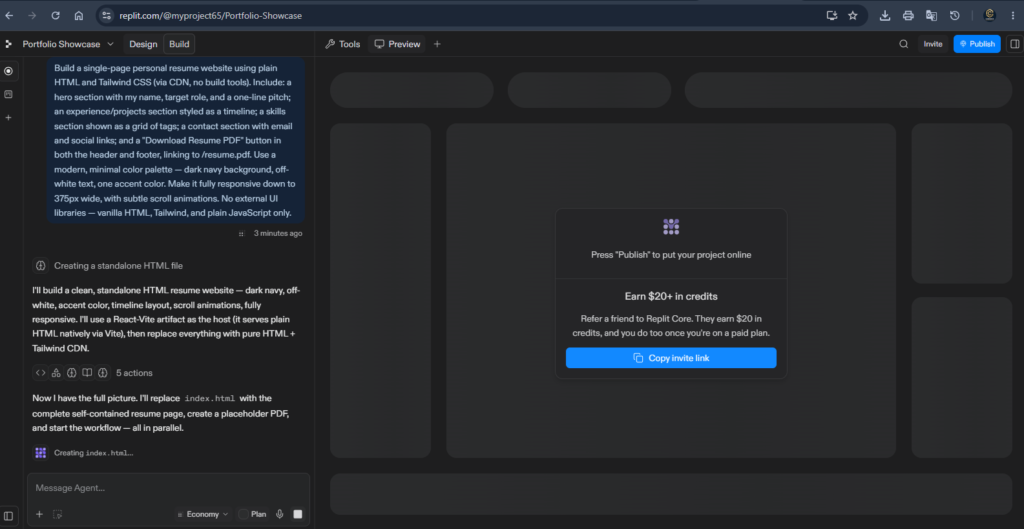
Notice what that prompt does: it names the exact sections, the exact stack (HTML plus Tailwind, no framework overhead), and clear constraints (no extra libraries, a specific mobile width target). Vague prompts like “make me a resume website” produce vague results. Specific prompts get you something close to what you’ll actually ship.
Step 3: The Sections Every Resume Website Actually Needs
Whatever the Agent generates first, check it against this list — these are the sections I include every single time:
- Hero section — your name, target role, and a one-sentence pitch. It’s the only part guaranteed to get read, so make it count instead of a generic “Welcome to my portfolio.”
- Experience / Projects — a timeline or card layout beats a wall of bullet points. Early in your career, lean on projects over job titles.
- Skills matrix — a grid of tags or a simple bar layout communicates more at a glance than a paragraph of “proficient in X.”
- PDF download button — recruiters still forward PDFs internally. Keep a downloadable version available even though the live site is the real showcase.
Anything past these four is optional. I’ve seen people add testimonials, blog links, or a full contact form, and none of it matters much if these four sections aren’t solid first.
Step 4: Customize the AI-Generated Code So It’s Actually Yours
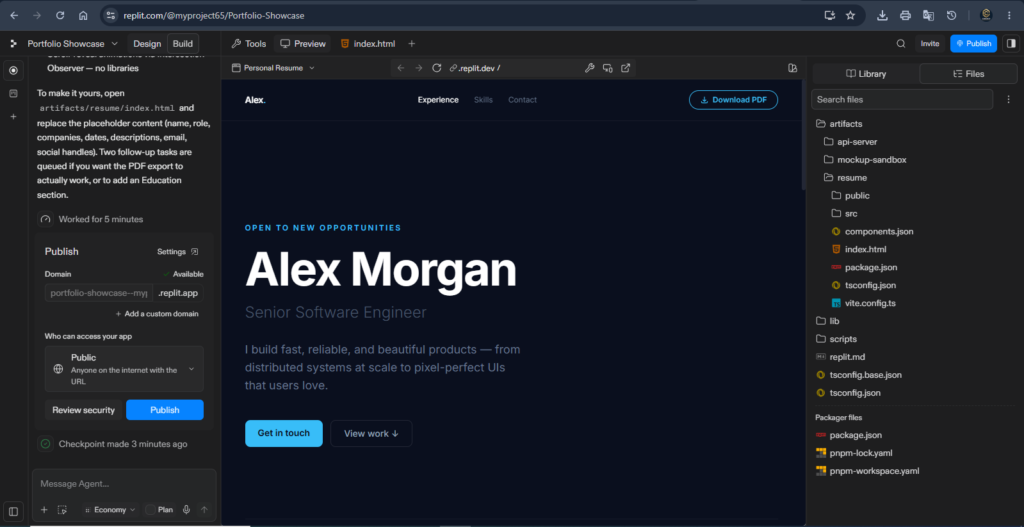
This is the step people skip, and it’s the one that separates a resume site from a resume site that looks like everyone else’s Agent output. Open the code files directly — Replit’s editor sits right next to the Agent chat — and go through them by hand:
- Swap out the placeholder color palette for something that isn’t the same navy-and-teal combo the Agent seems to default to constantly.
- Rewrite every line of AI-generated copy in your own voice. “Results-driven professional” belongs in the trash, not your hero section.
- Change the fonts. Google Fonts is one
<link>tag away, and it’s the fastest way to make a generated layout stop looking generated. - Add a real headshot or a simple illustrated avatar instead of the gray placeholder circle.
You can keep chatting with the Agent for bigger structural changes, but for detail-level tweaks like these, editing the HTML and Tailwind classes directly is faster than describing the change in words and waiting for a regeneration.This customization pass is the most critical part of learning how to build a resume website that actually gets noticed.
Step 5: Host and Deploy Your Resume Website for Free
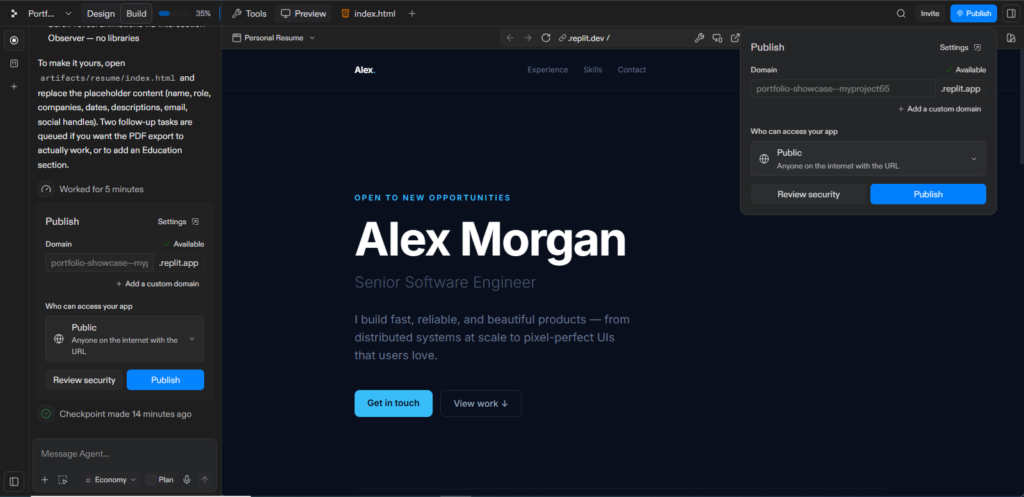
Once you’re happy with it, open the Deployments tab in your Repl. For a static resume site with no backend or database, choose Static Deployment — it’s the simplest option and the right fit for this kind of project. Replit builds the site and hands you a live URL on a .replit.app subdomain, which is plenty for a link you drop into a job application or an email signature.
Want your own domain instead of the .replit.app subdomain? You’ll connect it from the Deployments settings, but budget for that separately — you’ll need to buy the domain itself (through Replit or a registrar like Namecheap or Cloudflare), and in most cases you’ll need to be on a paid Replit plan to link it. The free Starter plan comfortably covers building the site and getting a basic live link; check Replit’s current pricing page before committing to anything past that, since these limits shift more often than most platforms.
Real Mistakes I Made (So You Don’t Have To)
Over-complicating the first prompt. My first attempt tried to cram animations, a blog section, a contact form, and a dark/light toggle into a single request. The Agent produced something bloated and half-broken. Now I generate the core structure first, then add features one at a time in follow-up prompts.
Forgetting mobile responsiveness. My first version looked sharp on my laptop and fell apart at phone width — the skills grid overflowed and the nav bar overlapped the hero text. Always resize your browser down to around 375px, or use Replit’s device preview, before calling anything finished.
Broken download links. The Agent will happily generate a download button pointing to a PDF before that PDF actually exists in your project. Upload the real file into your project root and test the download yourself — don’t assume it works just because the button renders correctly.
Leaving in placeholder copy. “Lorem ipsum,” a fake job title, or a stock testimonial sentence surviving into your deployed site is a fast way to look careless to the one audience — recruiters — who will absolutely notice.
Skipping basic SEO tags. A missing page title or meta description means your resume site won’t show up properly if someone searches your name. Two minutes in the page’s head section fixes this, and it’s worth doing before you share the link anywhere.
Frequently Asked Questions
Is Replit completely free for this? For the building part — yes. Everything described above for how to build a resume website runs on Replit’s free Starter plan and its daily Agent credits. Where it gets less clear-cut is deployment: a single published project is typically included free, but a custom domain or heavier hosting usually means upgrading to the paid Core plan. Worth a quick check on Replit’s current pricing page since these limits shift more often than most platforms.
Can I connect a custom domain? Yes, through the Deployments settings — but you’ll need to own the domain first (a separate purchase through Replit or a registrar) and, in most cases, be on a paid plan to link it. The default .replit.app link works perfectly well if you’re not ready for that step yet.
Do I need to know how to code? Not really, which is the whole point. I’ve walked non-developers through the whole process of how to build a resume website in an afternoon using nothing but the Agent chat and a bit of patience. Knowing some HTML helps for Step 4’s customization pass, but it isn’t required to get a working site live.Mastering how to build a resume website without monthly fees gives you complete control over your portfolio.
Is a resume website actually better than a PDF? It’s a complement, not a replacement. Recruiters still want a PDF for their applicant tracking system, which is why Step 3 keeps a download button in the design. But a live site lets you show real projects, link to actual work, and control the first impression in a way a static PDF never could.
Can I use this to create a resume builder website instead of just my own page? Yes — the workflow scales in that direction too. Instead of hardcoding your name and experience into the HTML, you’d add a simple form and some template logic so anyone’s details can generate their own version. It’s a natural next project once you’re comfortable with the one-page version.
What if I don’t like the design the AI generates? Regenerate the section, not the whole site — ask the Agent to redo just the hero or just the color scheme instead of starting from zero. Or take the structure it gave you and manually restyle it during Step 4. Treat the generated code as a starting point, not a final answer.
My Honest Take
I’ve built enough of these now to say this plainly: if you’ve been putting off figuring out how to build a resume website because it sounded like it needed a designer, a monthly subscription, or a computer science degree, none of that is true anymore. Replit’s free tier and one specific, detailed prompt will get you further in twenty minutes than a weekend with a drag-and-drop builder ever got me.
Start with the prompt in Step 2, keep the section list from Step 3 close by, and actually do Step 4 — the customization pass is what separates a resume site from a template with your name pasted into it. Deploy it, put the link at the top of your resume PDF and in your email signature, and let it do the talking a static document never could.Once you figure out how to build a resume website using free AI agents, you will never go back to standard PDFs.
If you want to refine your prompts for even better AI code generation, check out my detailed guide on ChatGPT vs Claude Prompt Improver to take your web development workflow to the next level.
